Native macOS · Free download
The SSH client
your Mac deserves.
MaciTTY is a fast, native macOS terminal client for SSH, Telnet, Rlogin and serial connections — saved sessions, key management, tunnels and deep terminal customization in a modern Mac app. All data stays on your Mac.
Universal build — Apple Silicon + Intel · macOS 14+ · free
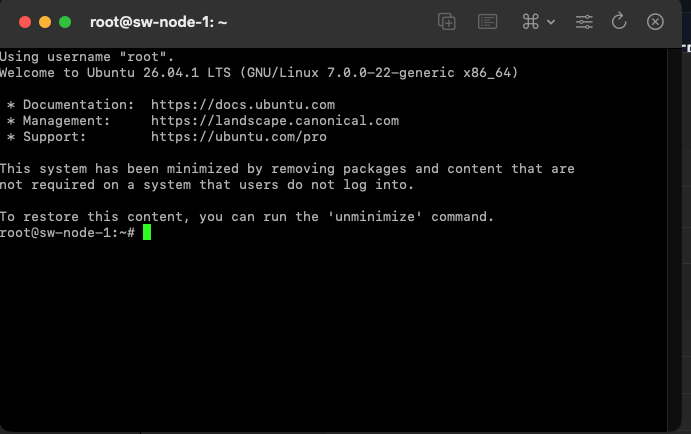
Already in your terminal
Everything below is implemented and shipping today.
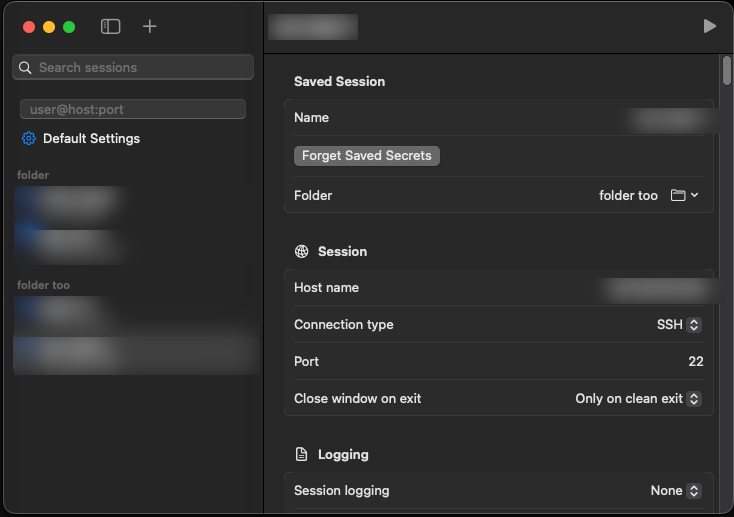
Session manager
Saved sessions organized in folders, a Default Settings profile everything
inherits from, quick connect (user@host:port, ssh://…),
search, and native macOS tabs and windows.
Keys & authentication
Every way in: password, keyboard-interactive, public keys
(.ppk and OpenSSH formats), ssh-agent, certificates
and Kerberos/GSSAPI — with per-session flexibility.
Every protocol
Secure SSH connections, plus Telnet, Rlogin, Raw TCP and Serial for network gear, embedded boards and legacy systems.
Tunnels & forwarding
Local, remote and dynamic (SOCKS) port forwarding you can edit live mid-session, X11 forwarding, agent forwarding and connection sharing.
Proxies & jump hosts
Reach hosts through HTTP CONNECT, SOCKS 4/5, Telnet commands, local commands or another SSH host — with exclusion lists and DNS handled at the proxy.
Deep terminal customization
Colours and palette editor, cursor styles, bells and Dock alerts, keyboard modes, mouse & selection behaviour, 25 legacy charsets, window size and behaviour — tune the terminal to how you work.
Advanced SSH control
Fine-tune key exchange, cipher and host-key preference lists, rekey limits, compression and keepalives, pin manual host keys, run a remote command or connect without a shell — including workarounds for quirky servers.
Security & privacy
Save passwords and key passphrases in the macOS Keychain, unlocked with Touch ID. Host-key verification on every new server. Each session runs in its own isolated process. No accounts, no telemetry — files stay locked down on disk.
Imports your ~/.ssh/config
Every Host becomes a saved session — includes,
jump hosts, forwardings and identity files carried over,
with a preview before anything is written.
Session logging
Record printable output, everything, protocol packets or raw data — with timestamped filename placeholders and append/overwrite/ask control.
Scriptable launch
Open sessions straight from the command line or scripts —
open -a MaciTTY --args -ssh -P 2222 -L 8080:web:80 user@host
— with support for saved sessions, keys, tunnels and serial parameters.
Speaks your language
Fully localized in English, German, Russian and Spanish from day one — menus, dialogs and settings included.
On the roadmap
MaciTTY is actively developed. Coming next:
Key manager planned
Generate RSA, ECDSA, Ed25519 and Ed448 keys right in the app, convert between formats, inspect fingerprints and comments, and manage certificates — no external tools needed.
Built-in SSH agent planned
A menu-bar agent that holds your keys and serves them to MaciTTY,
git, Terminal and every other app via SSH_AUTH_SOCK —
with an optional confirm-on-use prompt.
SFTP file transfer planned
A graphical file browser for your servers — upload, download, drag & drop, rename, permissions — plus command-line tools for scripting and automation.
Easy migration planned
Bring your existing setup with you: import saved sessions and host keys from other clients, plus an encrypted backup/restore for your whole library.
App lock in review
Lock the whole app behind Touch ID or your login password —
on launch, after idle, on sleep, or instantly with ⌃⌘L —
while your sessions keep running underneath.
The road to 1.0 planned
Developer ID signing and notarization for a smoother first launch, a polished installer, accessibility passes, performance tuning and opt-in update checks.
And more after that.
New features land regularly — the roadmap above is just what's next. Check back here for updates and fresh builds.
Take it for a spin.
Grab the latest build — free, universal, no account required.
The build is currently ad-hoc signed — on first launch,
right-click the app and choose Open, or run
xattr -dr com.apple.quarantine MaciTTY.app.
Proper signing and notarization are on the roadmap.